Article
AI workflows need escalation lanes
AI workflows need escalation lanes, not human babysitters. That is the practical difference between an automation that can operate near customers, CRM records, approvals, and internal data, and a demo that only looks safe because someone watches it all day.
The usual debate is badly framed. One side wants the agent to decide everything because manual review feels like defeat. The other side adds human approval to every output because the system cannot be trusted. Both choices break at scale. Full autonomy turns a probabilistic component into an unearned authority. Full review turns automation into a slower queue with better branding.
The better pattern is routing. Every action in the workflow should have an escalation lane before it ships: auto-pass, clarify, human approve, manager approve, or dead-letter. The lane is not a moral judgment on AI. It is an operating rule that says who owns risk, what evidence is needed, how long the workflow can wait, and what happens when nobody answers.
Human oversight is a routing problem
Human-in-the-loop automation is useful when it places human judgment at critical points, not when it makes people inspect every intermediate step. n8n’s guidance on human-in-the-loop automation is explicit about review checkpoints for risky or irreversible actions, approval gates, timeouts, branching, and audit logs. The important word is checkpoint. A checkpoint is not a permanent human shadow. It is a designed pause at the place where the consequence changes.
Think about an AI workflow that reads an inbound customer email, classifies intent, drafts a response, updates a CRM field, and triggers a refund request. The classification can usually run alone. The draft might run alone if it stays internal. The CRM update may need validation if it changes lifecycle status. The refund request needs an approval lane if money moves. If the customer asks for something ambiguous, the workflow should ask for clarification rather than invent certainty.
This is why escalation design belongs next to permission design. If an agent has broad tools but no routing model, it can reach actions that nobody intended to delegate. The same principle appears in AI agents need tool permissions, not blanket access: capability must be scoped. Escalation lanes add the second half of that scope. They decide when the capability is allowed to execute, when it must pause, and when it must leave a record for a later reviewer.
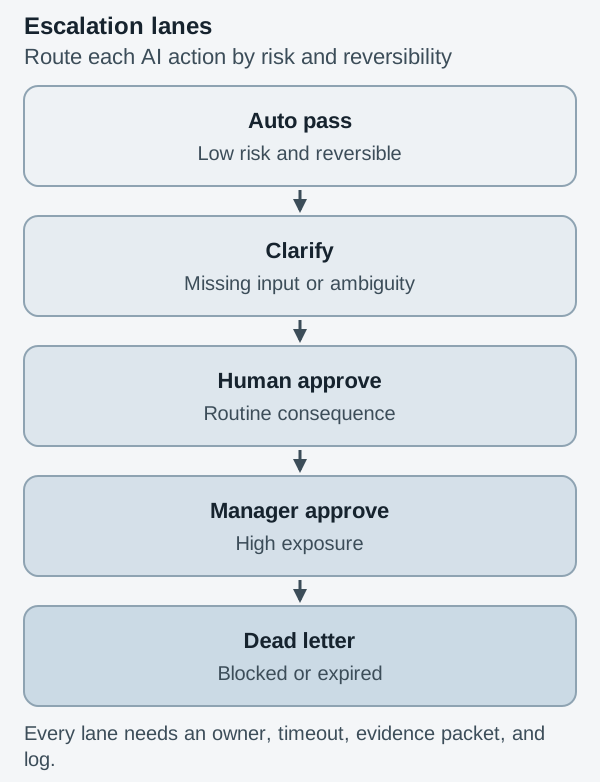
Which lane should each action use?
Start with five lanes. Do not start with roles or channels. Roles come after risk is clear.
The auto-pass lane is for reversible, low-impact steps with enough confidence and no sensitive side effect. Examples include tagging a low-risk ticket, drafting a summary, enriching a non-critical field, or preparing a proposed next action without executing it. Auto-pass still needs logs, but it does not need a person in the path.
The clarify lane is for missing input. This is not an error. It is a normal state in customer-facing and operations workflows. If the user asks for an address change but omits the new address, the workflow should ask for the missing field. If an internal request lacks a cost center, it should request one. Clarification is better than approval because the issue is not judgment. The issue is incomplete data.
The human approve lane is for consequential but routine decisions. Sending a customer-facing email in a sensitive account, changing a CRM lifecycle stage, granting standard access, or approving a small exception can land here. The reviewer should receive a short packet: proposed action, reason, source evidence, safe choices, and deadline.
The manager approve lane is for higher exposure: financial thresholds, contractual exceptions, policy overrides, access to sensitive systems, or customer commitments that create downstream obligations. This lane should not be a hidden version of human approve. It needs a different owner, stricter timeout, and clearer audit trail.
The dead-letter lane is for work that should not continue. It catches failed tool calls, conflicting evidence, policy blocks, missing owners, expired approvals, and repeated ambiguity. A dead-letter lane is not a trash bin. It is an operations queue with reason codes. If the same reason appears every week, the workflow is telling you where the design is weak.
What must every escalation lane log?
Each lane should write a small decision record. Without that, escalation becomes chat noise. At minimum, log the workflow run ID, input summary, proposed action, risk class, routing reason, reviewer, decision, timestamp, timeout rule, final outcome, and rollback or correction path.
This record matters for three reasons. First, it supports incident review. If a bad email was sent or a record was overwritten, the team can reconstruct what happened. Second, it supports workflow improvement. High escalation rates may mean the prompt is weak, the retrieval source is noisy, the policy is unclear, or the confidence threshold is wrong. Third, it protects the humans. Reviewers should not be asked to approve consequential actions from a vague Slack message with no evidence.
This connects directly to observability. A trace that says “agent decided” is not enough. You need to see what the agent saw, what tool it requested, which lane caught the action, and what a human changed. That is the contract described in AI agent observability needs trace contracts: traces are useful only when they preserve the evidence needed to explain behavior.
Where do escalation lanes belong?
Put lanes at irreversible actions first. Publishing, sending, deleting, overwriting, charging, refunding, granting access, changing status, and committing to a customer are the obvious places. Then look for actions that are technically reversible but socially expensive. A wrong customer message can be corrected, but trust may not recover. A bad CRM update can be rolled back, but the sales team may work the wrong account for two days.
Next, inspect ambiguity. Low confidence is one signal, but not the only one. Conflicting sources, missing fields, unusual amounts, policy keywords, sentiment spikes, and new customer segments can all route to review. The question is not whether the model sounds confident. The question is whether the workflow has enough evidence to take the next action.
Finally, design timeouts before launch. A workflow that waits forever is not controlled. It is stuck. For each approval lane, define what happens after 30 minutes, four hours, one business day, or whatever the context requires. Some actions should escalate to a backup owner. Some should default to the safest outcome. Some should move to dead-letter. The timeout is part of the decision, not an implementation detail.
How should you audit one workflow this week?
Pick one live AI workflow. Print the steps or list them in a table. Mark every action that changes the outside world or a system of record. For each marked action, assign one lane: auto-pass, clarify, human approve, manager approve, or dead-letter.
Then add four columns: owner, timeout, evidence packet, and rollback path. If you cannot fill those columns, the workflow is not ready for that action. It may still draft, summarize, classify, or prepare. It should not execute.
The goal is not to make AI timid. The goal is to make automation legible. When escalation lanes are explicit, humans stop babysitting the workflow and start governing the moments that matter. That is how AI work moves from impressive demo to reliable operation.