Article
AI roadmaps need task-exposure maps
Most AI roadmap debates start at the wrong altitude. A founder asks whether support, sales, finance, research, or engineering can be automated. A product lead asks which role will be changed by GenAI first. Those questions are too coarse to make a safe product decision. Roles contain bundles of tasks, and the tasks inside the same role can have very different exposure, risk, and need for human judgment.
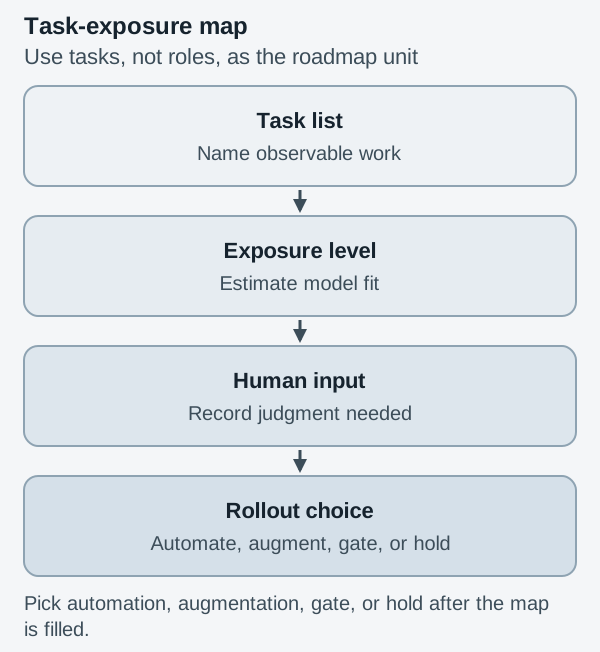
The better thesis is simple: AI roadmaps need task-exposure maps. Before choosing automation, augmentation, or no AI, a product team should list the actual tasks in a workflow, estimate how exposed each task is to GenAI, record the human input still required, name the consequence of failure, and then decide the rollout pattern.
Roles are too coarse for AI roadmap decisions
A job title is a convenient label for an org chart. It is not a reliable unit for an AI roadmap. A customer success manager may write follow-up emails, summarize calls, spot renewal risk, negotiate exceptions, update CRM fields, and calm down an angry account. Some of those tasks are language-heavy and repetitive. Some require context, trust, timing, or authority. Treating the role as a single automation target hides the real shape of the work.
The International Labour Organization makes the same distinction at labor-market scale. Its 2025 GenAI jobs update refines exposure estimates with task-level analysis, expert input, and AI predictions, covering nearly 30,000 tasks and grouping occupations into four exposure gradients. The report also stresses that, because many occupations still require human input, transformation is more likely than simple replacement for most jobs. That is exactly the product lesson: do not roadmap against roles when the technology enters through tasks. See the ILO summary, Generative AI and jobs: a 2025 update.
This matters because product teams love simple labels. “Automate onboarding.” “AI for support.” “AI analyst.” Each phrase compresses a messy workflow into a feature theme. Compression is useful for strategy decks, but dangerous for implementation. If the team skips the task layer, it will ship into the wrong surface area, measure the wrong denominator, and discover too late that the model is good at the visible text but weak at the decision behind it.
A task-exposure map gives the roadmap a smaller unit of analysis. It does not answer whether a department is replaceable. It answers where a model can help, where a human must stay in control, and where the product should not introduce AI yet.
What belongs in a task-exposure map?
A useful map can fit on one page. It needs five columns.
First, name the task in operational language. “Prepare weekly pipeline summary” is better than “sales reporting.” “Draft refund response from policy and order history” is better than “support automation.” The task should be small enough that someone can observe it being done.
Second, mark exposure. Use simple levels such as low, medium, high, and very high. Exposure does not mean “safe to automate.” It means the task contains patterns that current GenAI systems may be able to perform or support, such as drafting, summarizing, classifying, transforming, extracting, comparing, or generating variants.
Third, record required human input. This is the part many AI backlogs omit. What must the person provide before the model is useful? Context? Approval rights? Customer history? Taste? Policy judgment? Negotiation constraints? If human input is heavy, the right product may be a co-pilot, not an autonomous worker.
Fourth, write the failure consequence. A weak summary in an internal note is annoying. A wrong refund denial can damage trust. A hallucinated compliance answer can create legal exposure. A bad medical, financial, or safety recommendation can be unacceptable. Consequence changes the rollout even when exposure is high.
Fifth, choose the rollout decision: automate, augment, gate, or hold. Automate only when exposure is high, human judgment is low, and failure is recoverable. Augment when the model can reduce effort but the human still owns the decision. Gate when the model can act only after checks, approvals, or confidence thresholds. Hold when the task is not mature enough, the data is poor, or the consequence is too severe.
This complements the idea that model selection needs task portfolios. A portfolio tells you which model capabilities matter across a body of work. A task-exposure map tells you where those capabilities should enter the workflow.
Where does human input still matter?
The hardest part of AI product work is not finding exposed tasks. It is deciding whether the human contribution is incidental or essential. A model may draft a renewal email, but the account owner may know that the customer is angry about a recent outage. A model may summarize a research interview, but the product manager may hear a contradiction that changes the roadmap. A model may classify inbound tickets, but support leads may know that a VIP customer’s issue needs a different path.
Human input usually matters in four places.
It matters before the task, when the person frames the goal. A vague instruction can produce plausible output that misses the real decision. It matters during the task, when the person catches missing context, wrong assumptions, or tone problems. It matters after the task, when the person decides whether to act. And it matters around the task, when norms, policy, incentives, and relationships affect what “good” means.
This is why a task-exposure map should not be written by the AI team alone. Bring the person who performs the work, the product owner, an operational manager, and someone who understands risk. Ask them to walk through one real case, not an idealized version. Where did they pause? What information did they look up? What did they know but not write down? What would make a wrong answer expensive?
Those answers are product requirements. They define context fields, approval gates, fallback paths, audit logs, and escalation lanes. They also stop the team from turning every exposed task into a model-led feature.
Use exposure to choose automation, augmentation, or hold
A roadmap item should not say “add AI to support triage.” It should say: “For low-risk billing questions, classify the ticket, retrieve the relevant policy, draft a response, and require agent approval for the first release.” That sentence contains a task, a boundary, a human input, and a rollout choice.
This is also where milestone design matters. A demo can make an exposed task look solved because the happy path is easy to stage. Production exposes edge cases, missing permissions, ambiguous inputs, and angry users. Before a feature graduates, connect the map to release gates like the ones described in AI product milestones need demo-to-product gates. A task with high exposure and low consequence might pass through a lightweight gate. A task with high consequence needs stricter evidence, review, and rollback.
Measurement should follow the same logic. Do not only ask how many people used the AI feature. Ask how many eligible tasks existed, how many were routed to AI, how many required human edits, how many were escalated, and how many caused rework. This is close to the discipline behind AI adoption metrics need denominator maps. Adoption without the right denominator can make a narrow assistant look more important than it is, or hide a useful feature because the eligible task volume is small but valuable.
A practical scoring rule helps. If exposure is high, human input is low, and failure consequence is low, test automation. If exposure is high but human judgment is meaningful, design augmentation. If exposure is medium and consequence is high, use AI only for preparation, retrieval, or drafting behind a gate. If exposure is low, do not force the model into the workflow just because the roadmap needs an AI label.
Audit one workflow before adding AI
Choose one workflow this week. Not a department, not a job family, not a strategy theme. Pick a workflow with visible handoffs, such as inbound support, contract review intake, product feedback synthesis, lead qualification, QA triage, or onboarding.
List ten tasks in the order they happen. For each task, fill the five columns: task, exposure, human input, failure consequence, rollout decision. Then look for the first narrow place where AI can reduce effort without pretending to own the whole job. That is the starting roadmap item.
The point is not to be timid. The point is to be precise. AI products become useful when they enter work at the right task, with the right boundary, and the right human role. A task-exposure map makes that choice visible before the team spends a quarter building the wrong kind of automation.